
For a long while now, I have been using GitHub to manage my project repositories for PCBs. However, my workflow lacked the discipline and control to manage the version of a printed circuit board. In this post, I am proposing the use of GitHub Actions to help with managing the design file to Gerber file versioning..
The idea started with the work on a previous project KiCad2Fritzing. In this project, I needed to create a GitHub action to create a release that would eventually be used but the KiCad Plugin GitLab repository. During the development of that project, I also learned about the kicad-cli utility (KiCad Command Line Interface). From these two I wondered if it were possible to create an action that would use the kicad-cli to generate the Gerbers for me into a release. The basic workflow would be along the lines of
- Develop the PCB
- Push all the changes to main
- When ready to release the Gerber files for production, create a release by tagging the main branch i.e.
tag r1.0.0push origin tag 1.0.0
- This would then trigger the action on GitHub to invoke kicad-cli to generate the Gerber files.
- The Gerber files are then available as a ZIP file under the releases section of the repository.
- This ZIP can be then downloaded and handed, inspected with the Gerber viewing tool, as a final check, before sending off for fabrication.
I will admit, since my experience with GitHub Actions is minimal, I vibe-coded the .guthub/workflow script to perform the steps. This saved me quite a lot of time and allowed me to focus on the functional aspects of what I was wanting to create. I opted for a tag release format of r#.#.#, meaning tags like r1.0.0 or r2.3.10 etc.
Along the way, I also thought about the revision text that I like to have printed on the circuit board. KiCad supports an internal text variable called REVISION. This can be used within text objects and will resolve to the value that is entered into the Page Settings, Revision field.
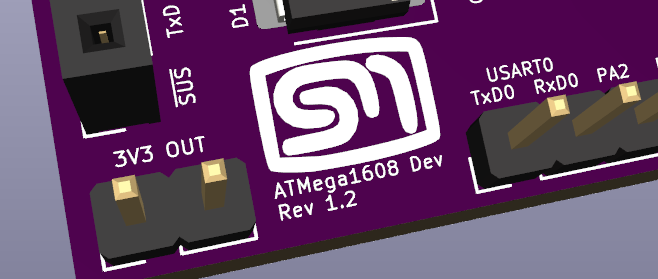
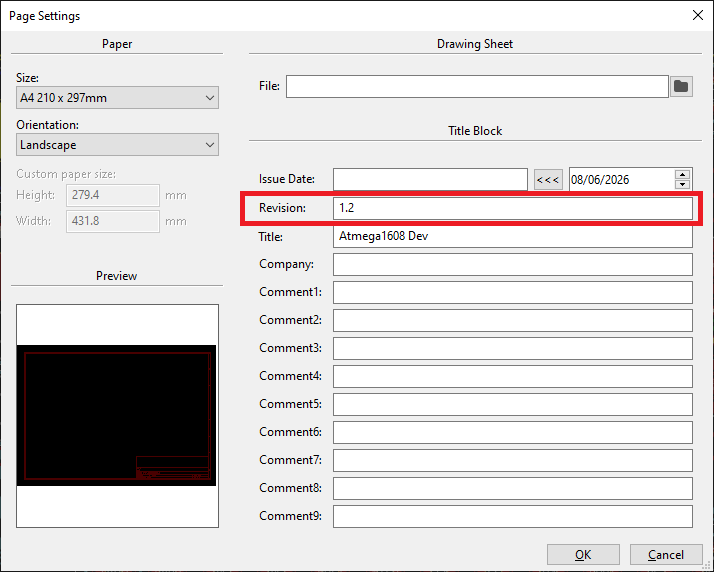
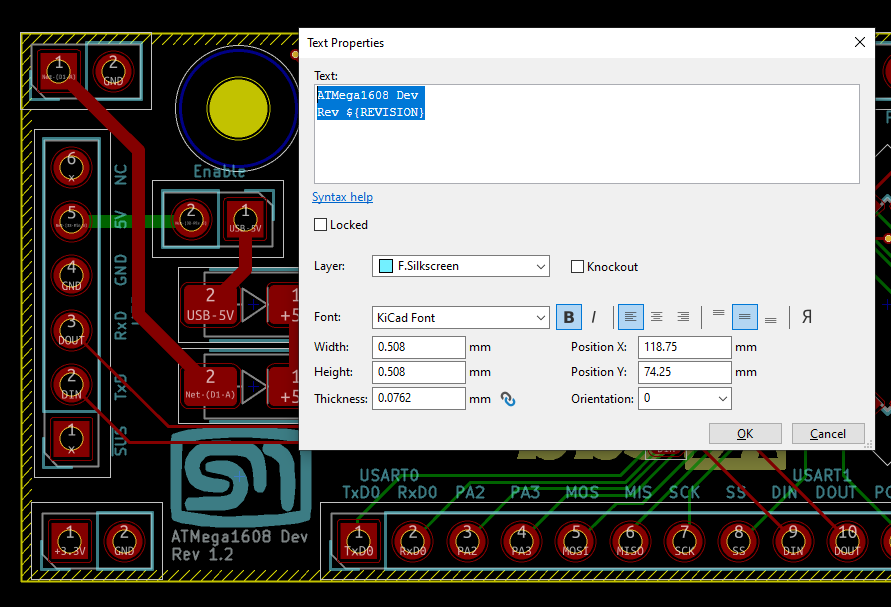
The text value in the PCB that should display this value only needs to reference the Revision field using the Text Variable notation ${REVISION}. Any change to this field will be reflected on the board and on the subsequent Gerber files.
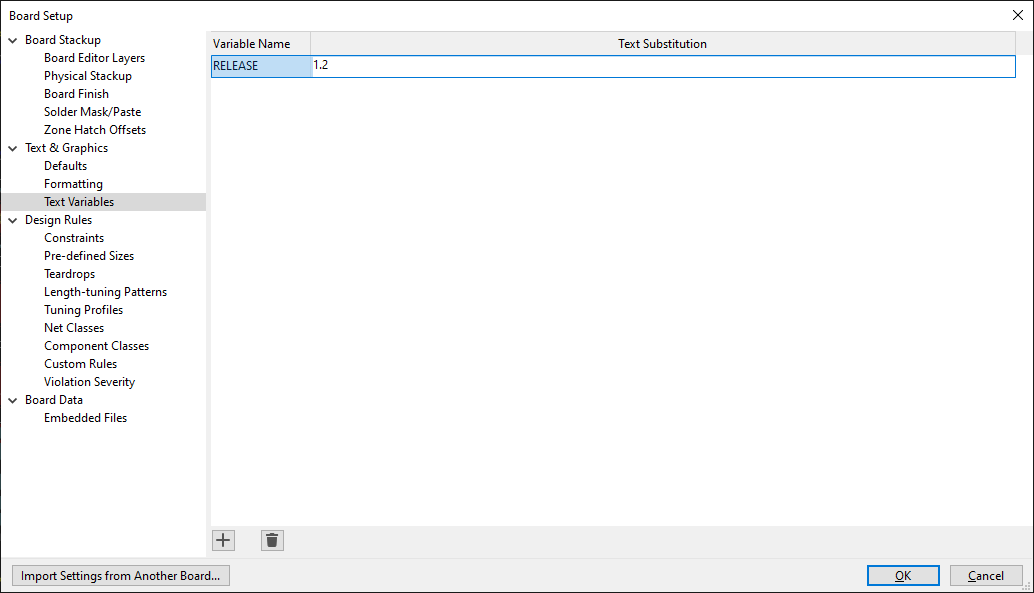
The problem I had was that it does not seem possible to change this field value programmatically. The best workaround I could come up with was to create my own text variable – I chose RELEASE, and set this value as the revision in the page setting. The Text Variable is defined in the File -> Board Setup menu option under the Text & Graphics section.
Making It Reusable
Rather than embed this workflow directly into each KiCad project, I wanted something I could install cleanly into any project without having to copy and re-edit files by hand each time. The result is a small module repository – kicad-release-automation-module – which holds the workflow template, a Python script that handles the actual gerber generation, and an example configuration file.
Installing it into a KiCad project is a single command:
./install.sh /path/to/your/kicad-project-repo
The script takes care of creating the necessary directory structure (.github/workflows/, scripts/) and copies across the workflow YAML and the Python generation script. It also drops in a release-artifacts.json configuration file if one doesn’t already exist – but importantly, it won’t overwrite one that does, so there’s no risk of clobbering a project-specific configuration on a subsequent install.
The release-artifacts.json is where you tell the module about your specific project: the path to the .kicad_pro file, and which layers you want included in the gerber export. Once that’s set up and committed, the project is ready to go.
The diagram below shows what gets installed into a target KiCad project repository and how the pieces relate to one another.
+-- examples| || +-- release-artifacts.json|+-- scripts| || +-- generate_release_artifacts.py|+-- templates| || +-- .github| || +-- workflows| || +-- release-gerbers.yml
Testing It Out
I used the atmega1608_dev repository as the test bed – a breakout and development board for the ATmega1608 that I’ve been working on. I added the RELEASE KiCad text variable and set the Revision in the title block to ${RELEASE}. Running through a few release tags gave me a good sense of where things needed adjusting. One iteration, for example, involved switching the CI workflow to use a KiCad nightly build, which was needed to correctly handle the board file format I was working with. Another was a straightforward fix to ensure the project name was correctly prefixed to the gerber zip archive – something that only becomes obvious when you look at the actual release assets and realise the naming isn’t quite right.
After working through those iterations, the releases page for the atmega1608_dev repository now shows cleanly versioned assets, generated automatically from the tag. It’s satisfying to see r1.3.1 and r1.3.2 sitting there with their associated zip files, knowing that each one corresponds to an exact, reproducible snapshot of the board at that point in time.
Conclusion
It’s a small piece of infrastructure, but it addresses something that had been quietly bothering me for a while. I can also see scope for further improvements such as running DRCs or exporting other artefacts for documentation purposes. Since I am in the hobby domain, I will stick with what I have here for a while to bed in the workflow and assess the further changes.

